Hey everyone, if you’ve ever been deep into setting up a new monitor, fixing a dead laptop screen, or even swapping out a broken display on your phone, you’ve probably run into that annoying screen flicker out of nowhere. I’m a display FFC (that’s flexible flat cable, for the newbies) supplier, and let me tell you—this is one of the most common questions I get from customers all the time: “Why the hell is my screen flickering with a flexible flat cable?” Display Flexible Flat Cable
First off, let’s cut the tech jargon a little, because I know half of you just want to get your screen back to normal, not memorize a bunch of terms. I’ve been doing this for like 8 years, working directly with repair techs, small electronics shops, and even a few indie gadget makers, and I’ve seen pretty much every FFC-related flicker issue there is. Let’s break this down like we’re chatting at a workbench after a long day.
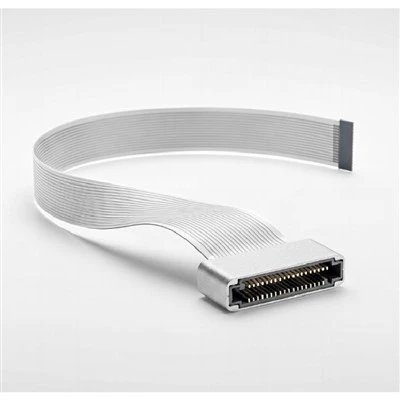
First, let’s remember what an FFC does, right? It’s that thin, flat, ribbon-like cable that connects your display (the part you stare at) to the motherboard or the display controller board (the brain that tells the screen what to show). Unlike old round ribbon cables with individual wires, FFCs are flat, multiple tiny conductors all stuck together with a thin plastic cover—they’re super flexible, which is why they’re used in everything from phones to gaming monitors to TVs. But that flexibility is also their biggest strength… and their biggest weakness, when it comes to flicker.
Let’s start with the most common cause: bad contact between the FFC and its connectors. This is like when you plug in your headphones and one side cuts out unless you wiggle the cord a little—only way more noticeable because your screen is right there. A lot of people think FFCs are “plug and forget,” but over time, two things happen here. First, the connectors themselves get dirty. You’d be surprised how much dust, lint, and even tiny bits of skin oil can build up in those tiny metal slots where the FFC’s pins go. I’ve had a repair tech send me a photo once of an FFC connector in a laptop that had so much dust it looked like a coffee stain—no wonder the signal was dropping in and out, causing flicker that would come and go when you moved the laptop lid.
Second, and this is way more common with flexible flat cables specifically, is contact wear from repeated bending. FFCs are meant to bend, right? But if you’re opening and closing a laptop 100 times a day, or moving a monitor around, or even just adjusting your phone’s screen angle every five minutes, that bend happens over and over. The tiny metal pins on the FFC (or the ones in the connector) start to wear down a little. They get tarnished, or the plating rubs off, so when they touch, it’s not a full clean connection. That’s why you might notice the flicker gets worse when you move the device—like if your laptop screen flickers only when you tilt it back more than 45 degrees. That’s the contact point breaking for a split second, causing the screen to drop its signal and flicker. I had a customer last month who was replacing FFCs every three months for their repair shop’s most popular laptop model, because that laptop’s FFC is built to bend at that exact angle, and the contacts wear fast. We adjusted the FFC’s bend radius a little when we customized theirs, and they haven’t had a flicker issue since—little tweak, huge difference.
Next up: signal interference. Wait, what does a thin flat cable have to do with that? Let’s think again about the FFC’s design. Those tiny conductors on the FFC—they carry the video signal, right? And if they’re not shielded properly, they can pick up noise from other nearby components. Like, if your FFC is routed too close to the laptop’s power cable, or the Wi-Fi antenna, or even a speaker’s coil, that electromagnetic noise can mess with the video signal. It’s like when you hold your phone near a speaker and get that static buzz—just in screen form. I’ve seen this more in custom builds, where people forget to separate the FFC from power wires, or in older devices where the FFC’s original shield is worn down. A lot of cheap FFCs use a thin foil shield that peels off after a year or two of bending, so suddenly all that noise gets in. The result? Constant flicker, maybe with weird lines across the screen too. That’s not a contact issue—that’s signal bleed, and it’s super common when the FFC’s shielding is shot.
Another big one: physical damage to the FFC itself. It’s flexible, but that doesn’t mean it’s unbreakable. I see so many FFCs that have kinks, or tiny cuts along the conductors, or even just a stretch that made the pins pull loose a little. Think about when you fold a piece of paper too many times—eventually it tears. Same with an FFC. If you’ve ever dropped your laptop with the screen open, or stepped on a cable, or even just pulled too hard when you were replacing a battery, that tiny kink in the FFC can break one or two of the tiny video conductors. You won’t even see it with the naked eye—they’re like a tenth the thickness of a human hair. But even a partial break will cause the signal to drop intermittently, which shows up as flicker. I once got an email from a guy who swore his new monitor was defective, because it flickered every time he turned the brightness up. Turned out the FFC had a tiny, almost invisible tear right where it bent around the monitor’s hinge—when the brightness got higher, the signal load increased, and the broken conductor couldn’t handle it, causing flicker. We sent him a new FFC that was made for that specific monitor, no tear, and he hasn’t had a problem since.
Wait, let’s not forget about manufacturing defects, too. I know, as a supplier, I hate saying that, but it’s true. Not all FFCs are made equal. Some cheap FFCs out there use thinner conductors, or bad plating on the pins, or they skip the shielding to cut costs. I’ve seen FFCs from random online sellers that have pins that are slightly misaligned, so when you plug them in, only two out of five make full contact. That’s a guaranteed flicker issue, almost right out of the box. And no, it’s not just because they’re cheap—sometimes even FFCs that are billed as “compatible” don’t match the exact bend length or pin count of the original, so they’re putting stress on the connectors from day one, leading to early contact wear. That’s why a lot of repair techs stick with us (and other reputable FFC suppliers) because we make sure every cable is tested to match the exact specs, no misaligned pins, no thin conductors, proper shielding for the application.
Let’s also talk about something that’s not just the FFC, but works with it: connector damage on the device side. Wait, that’s a common mix-up—people blame the FFC, but it’s actually the connector on the laptop or monitor that’s the problem. But why does that show up as a screen flicker with the FFC? Because the FFC is the middleman. If the device’s connector has bent pins, or it’s loose, or it’s got corrosion, then even a brand new FFC won’t make a good connection. I’ve had customers send me videos of their flicker issue, and I can tell in 10 seconds that it’s the device connector, not the FFC. For example, if the flicker is only there when you press a certain spot on the connector housing, that’s definitely the device side, not the cable. But here’s the thing: if you replace the FFC without checking the device connector, you’ll just waste money on a new cable that still has the same problem. So that’s a quick tip I always give: before you blame the FFC, wiggle the connector on the device (gently!) to see if the flicker changes. If it does, it’s either the FFC contact or the device connector.
Another thing I’ve noticed over the years: temperature and humidity can play a role too. FFCs are made with plastic insulation, right? That plastic can expand and contract a little with temperature changes. If it’s super cold, the plastic might shrink, pulling the pins on the FFC slightly away from the connector, leading to a loose connection and flicker. If it’s super humid, moisture can get into the connector, causing corrosion on the pins, which affects the contact. I’ve had people in places like Alaska and Florida deal with this more than others—extreme temps or high humidity just add extra stress to the FFC’s connections.
Wait, let’s make sure we’re not mixing up flicker with other screen issues. A lot of people call any screen problem “flicker,” but sometimes it’s a refresh rate issue or a driver problem. But if it’s specifically linked to the FFC—like if the flicker started right after you replaced the screen or adjusted the cable, or it gets worse when you move the device—then it’s almost certainly the FFC or its connections. I get so many people saying “I updated my drivers and it didn’t fix the flicker, so it must be the screen” and then when we talk, it turns out the FFC was installed wrong. That’s another big one: improper installation. If you don’t seat the FFC correctly in the connector (most connectors have a little latch that you have to flip up to insert the cable, then flip back down to lock it), if you bend the FFC too sharply when installing it, or if you route it wrong so it gets pinched, that will cause flicker right away. I once had a repair tech who insisted our FFC was defective, until he admitted he skipped flipping the connector latch when he installed it—half the pins weren’t even touching. He was mortified, but it happens to everyone, even the pros.
Now, let’s talk about how to fix these issues, because that’s what everyone actually cares about. First, check the connections. Turn off your device, unplug it, open up the casing, pull the FFC out gently (don’t yank it—pull by the plastic end, not the cable), use a soft lint-free cloth to clean the connector slots and the FFC’s pins (if there’s a lot of gunk, you can use a tiny bit of isopropyl alcohol, just make sure it’s fully dry before plugging it back in). When you reinsert it, make sure the latch is locked—you should hear a little click, and the FFC shouldn’t pull out easily. If that doesn’t work, check for kinks or tears in the FFC. If you see a kink, or if the cable is stretched thin in one spot, that’s a sign it’s damaged and needs to be replaced.
If it’s signal interference, that’s usually a routing fix—make sure the FFC is at least half an inch away from power cables, speakers, or antennas, and if it’s old, you might need to replace it with a new one that has intact shielding. If it’s a temperature or humidity issue, sometimes just keeping your device in a more stable environment helps, or you can add a tiny bit of insulation to protect the FFC from extreme temps.
And if you’ve tried all that and the flicker is still there, it’s probably time to replace the FFC. But here’s the pro tip: don’t just grab the cheapest FFC you can find on Amazon. Make sure it’s the exact model for your device, with the right pin count, length, and bend radius. If you’re not sure, reach out to a FFC supplier and tell them your device model—we can help you get the right one, no wasted money on cables that don’t fit. As someone who’s been in this game for years, I’ve seen way too many people waste $10 on a cheap FFC that lasts two months, instead of spending $15 on a quality cable that lasts two years.

At the end of the day, screen flicker with an FFC is almost never a mystery. It’s either a bad connection, a damaged cable, interference, or a compatibility issue. I’ve fixed more flicker issues with cleaning a connector or replacing a slightly damaged FFC than I can count. If you’re going through this yourself, or if you’re a repair tech tired of dealing with flicker related to display FFCs, don’t hesitate to reach out to us. We make customized FFCs for all kinds of displays, test every cable for connection integrity and shielding, and we can help you troubleshoot or get the exact part you need. No guesswork, no cheap junk, just quality FFCs that get the job done.
Flexible Flat Cable FFC References:
- Electronic Components Industry Association. Flexible Flat Cable (FFC) Design and Application Guidelines. 2021.
- Repair, Bench. Common Flex Cable Failure Modes in Portable Electronic Devices. 2022.
- IEEE Transactions on Electromagnetic Compatibility. Signal Interference in Flexible Flat Cables for Display Applications. 2020.
- Display Supply Chain Consultants. Global Display FFC Market: Performance and Failure Analysis. 2023.
Tennrich Electronics Technical Development (Kunshan) Co., Ltd.
As one of the most professional display flexible flat cable manufacturers and suppliers in China, we’re featured by quality products and low price. Please rest assured to buy cheap display flexible flat cable for sale here from our factory. We also accept customized orders.
Address: NO.159 South Wusongjiang Road ,Kunshan Economic Technical & Development zone,Suzhou city,Jiangsu province, China.
E-mail: foreigntrade@tennrich.net
WebSite: https://www.china-ffcs.com/
